Comparison
ContactRoll vs Zoho Desk for a team of five
Zoho Desk is Zoho’s help desk, sold in editions from Free to Enterprise. Its telephony channel starts on Professional, where calls set up in Zoho Voice are answered inside Desk, and a team adds Zoho CRM for deals and Zoho Campaigns for marketing email.
What five people would buy at Zoho Desk to match ContactRoll
| What the team needs | At Zoho Desk | Per month |
|---|---|---|
| Support email as tickets, a public knowledge base, and calls answered inside the help desk | Zoho Desk Professional, 5 agents at $23 (the first edition with the telephony channel) [1][2] | $115 |
| A phone menu, call queues and recording | Zoho Voice Standard, one administrator license, which covers up to 10 agents who take calls inside Zoho’s apps (multi-level phone menu, call queues, recording) [3][4] | $49 |
| A phone number | A Zoho Voice local number, 1 credit ($1) a month [4] | $1 |
| A CRM with contacts, companies and a deals pipeline | Zoho CRM Standard, 5 users at $14 [5] | $70 |
| Marketing email to about 2,000 contacts, with sign-up forms | Zoho Campaigns Standard, up to 2,500 contacts [6] | $12.75 |
| Call minutes and recording | Charged by use in Zoho Voice credits past the license’s 1,000 incoming and 250 outgoing minutes on US numbers; recording at 0.0025 credit a minute [3][4] | Usage |
| Zoho Desk, about | Includes Zoho Desk, one Zoho Voice license and number, Zoho CRM and Zoho Campaigns; it leaves out minutes past those included, recording and storage, and taxes. On Campaigns’ free plan, which covers 2,000 contacts and 6,000 emails a month, the total is $235. | $247.75 |
| ContactRoll Plus | 5 × $59, paid yearly; Twilio bills calls to you. | $295 |
For a team of 3 people or fewer, ContactRoll Free costs nothing: 1,000 contacts, one pipeline, one support address, calling through your own Twilio account, and 500 marketing emails a month (Free’s limits). Zoho Desk’s free plan is for 3 agents. (Zoho Desk’s pricing page, read .) Zoho CRM’s free edition is for 3 users. (Zoho CRM’s pricing page, read .)
Which one to choose
Choose Zoho Desk if
- Your team takes calls inside the help desk with Zoho Voice: one Standard license covers up to 10 agents who take calls in Zoho’s apps. [3][4]
- Tickets, a public knowledge base and telephony at $23 an agent is the price you want: that is Desk Professional. [1][2]
- Your list fits Zoho Campaigns’ free plan, which covers 2,000 contacts and 6,000 emails a month. [6]
Choose ContactRoll if
- You want calls from the first plan: Zoho Desk’s telephony channel starts on Professional.
- Your agents also sell, and their deals should sit beside the tickets without Zoho CRM.
- You would rather run one product than Desk, Voice, CRM and Campaigns.
In ContactRoll, against Zoho Desk
- Calls, recorded with an announcement if you choose, on every plan, Free included.
- A deals pipeline with a forecast in the same product as the help desk.
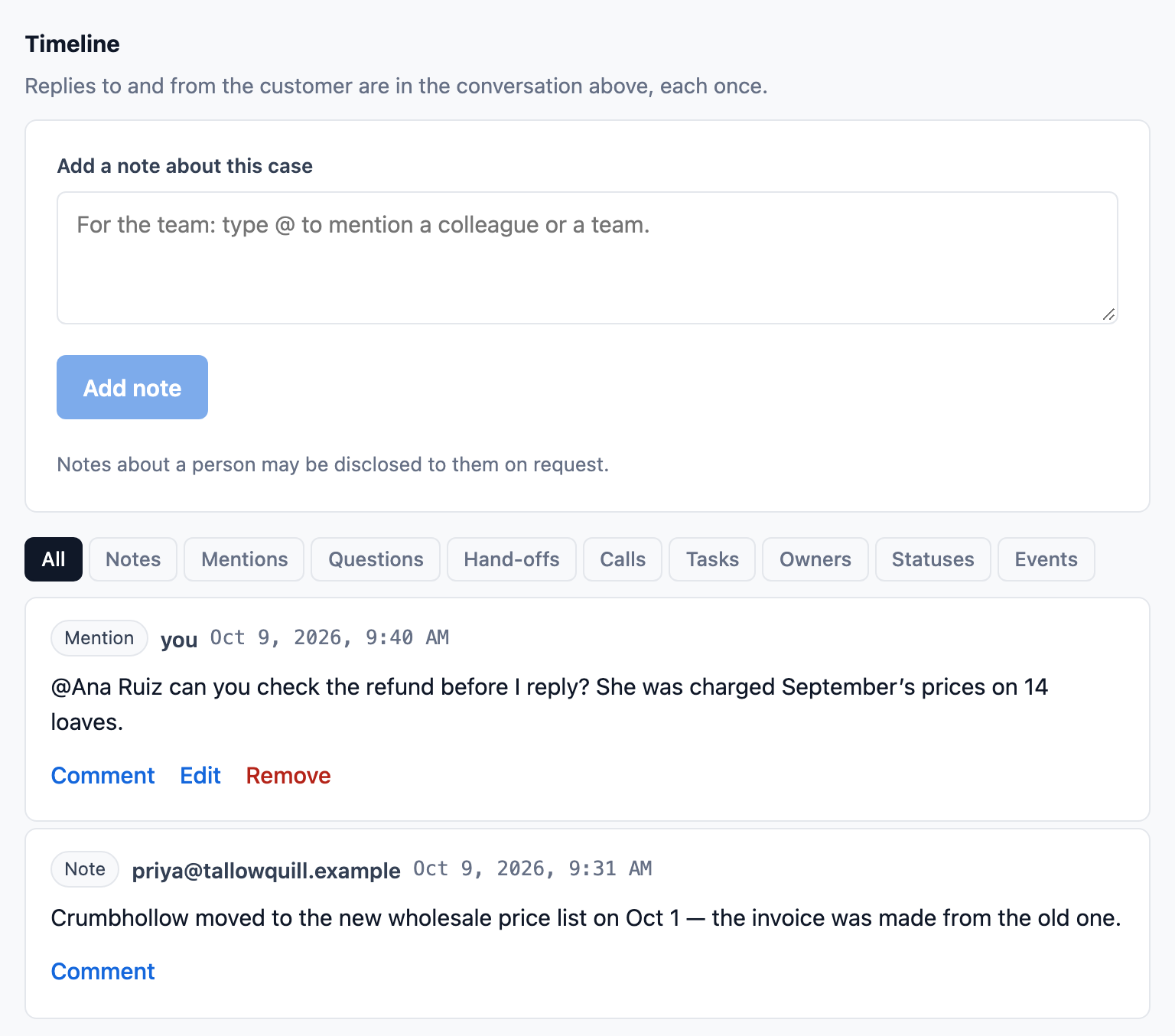
- Notes and @mentions of a colleague or a team on any case or contact.
- Territories, quotes your customer accepts online and an Approvals page, on every plan, beside the help desk.
Sources
Zoho Desk’s prices change; its own pages below decide. Zoho Desk is its owner’s trademark.
- Zoho, Zoho Desk price list (the file the pricing page loads): https://www.zoho.com/sites/zweb/json/pricing/desk-pricing-val.json, read 2026-10-11.
- Zoho, Zoho Desk edition comparison: https://www.zoho.com/desk/pricing-comparison.html, read 2026-10-11.
- Zoho Voice help, Zoho Desk telephony integration: https://www.zoho.com/voice/help/zoho-desk-telephony-integration.html, read 2026-10-11.
- Zoho, Zoho Voice pricing: https://www.zoho.com/voice/pricing.html, read 2026-10-11.
- Zoho, Zoho CRM price list (the file the pricing page loads): https://www.zoho.com/sites/zweb/json/pricing/crm-pricing-val.json, read 2026-10-11.
- Zoho, Zoho Campaigns pricing: https://www.zoho.com/campaigns/pricing.html, read 2026-10-11.
Questions
What do I give up by leaving Zoho Desk?
A help desk with editions up to Enterprise, and its place among Zoho’s other apps. ContactRoll has no AI agent and no editions beyond Plus.
How do our Zoho contacts come across?
Export them as a CSV file. A file from Zoho CRM is read as it comes, account and phone columns included; a Zoho Desk contacts file works too, with each column chosen once. Past tickets are not imported.
What happens to our Zoho Voice number?
ContactRoll places and takes calls through your own Twilio account, so you buy a number there or move yours to Twilio. Callers then reach the call groups and the phone menu you set in ContactRoll.