Comparison
ContactRoll vs HubSpot for a team of five
HubSpot sells a CRM with separate hubs for marketing, sales and customer service, each in Starter, Professional and Enterprise editions.
What five people would buy at HubSpot to match ContactRoll
| What the team needs | At HubSpot | Per month |
|---|---|---|
| Support email as tickets, a knowledge base, and a CRM with deals | Service Hub Professional, 5 seats at $90 (the knowledge base is not in Starter; deal pipelines are part of the CRM) [1][2] | $450 |
| Calling with a phone menu, transfer and recording | Included in Service Hub Professional: 3,000 minutes a month for the account, up to 3 HubSpot numbers, a phone menu (IVR) and call recording; more minutes are $50 a month per 1,000 [2][3][4] | Usage |
| Marketing email and sign-up forms | Marketing Hub Starter, 1 seat at its $20 list price, with 1,000 marketing contacts (a new-customer offer is lower) [2][5] | $20 |
| Room for about 2,000 marketing contacts | 1,000 more marketing contacts on Starter [2] | $50 |
| HubSpot, about | Includes the five Service Hub seats, one Marketing Hub seat and the extra contacts; it leaves out the required $1,500 one-time Professional onboarding, minutes past the included 3,000, taxes, and any change HubSpot makes when editions are mixed in one account. | $520 |
| ContactRoll Plus | 5 × $59, paid yearly; Twilio bills calls to you. | $295 |
For a team of 3 people or fewer, ContactRoll Free costs nothing: 1,000 contacts, one pipeline, one support address, calling through your own Twilio account, and 500 marketing emails a month (Free’s limits). HubSpot’s free tools are for up to 2 users, with 2,000 marketing email sends a month that carry HubSpot’s branding. (HubSpot’s pricing page, read .)
Which one to choose
Choose HubSpot if
- You want minutes and numbers that come with the plan: Service Hub Professional includes 3,000 calling minutes a month for the account and up to 3 HubSpot numbers, with a phone menu. [2][3][4]
- You expect to grow into HubSpot’s top edition, where Enterprise adds custom permission sets and field-level permissions. [7]
- Your marketing already runs on Marketing Hub, and you want service tickets in the same HubSpot account. [5]
Choose ContactRoll if
- You would rather not pay the $1,500 one-time onboarding HubSpot requires with Service Hub Professional.
- You want each call billed by Twilio per minute to your own account, instead of an allowance of minutes the whole account shares.
- You want a phone menu that rings the caller’s own owner first on Plus; HubSpot’s menu rings one named person only for an Enterprise seat.
In ContactRoll, against HubSpot
- Five people on Plus pay $295 a month, paid yearly, for the CRM, the help desk, calling and marketing email, with no onboarding fee.
- A deal, a case and a call sit on one contact’s timeline: there is no second hub to buy and connect.
- Roles of your own on Plus, made from a copy and checked with View as, where HubSpot keeps custom permission sets for Enterprise.
- Up to 10,000 marketing contacts on Plus, with no contacts tier to add, and every email sent only to people with a consent record.
Roles, automation, calling and the help desk
HubSpot’s Service Hub, edition by edition, from HubSpot’s own pages read on October 14, 2026, beside what ContactRoll does and which plan has it.
| Topic | HubSpot Service Hub | ContactRoll |
|---|---|---|
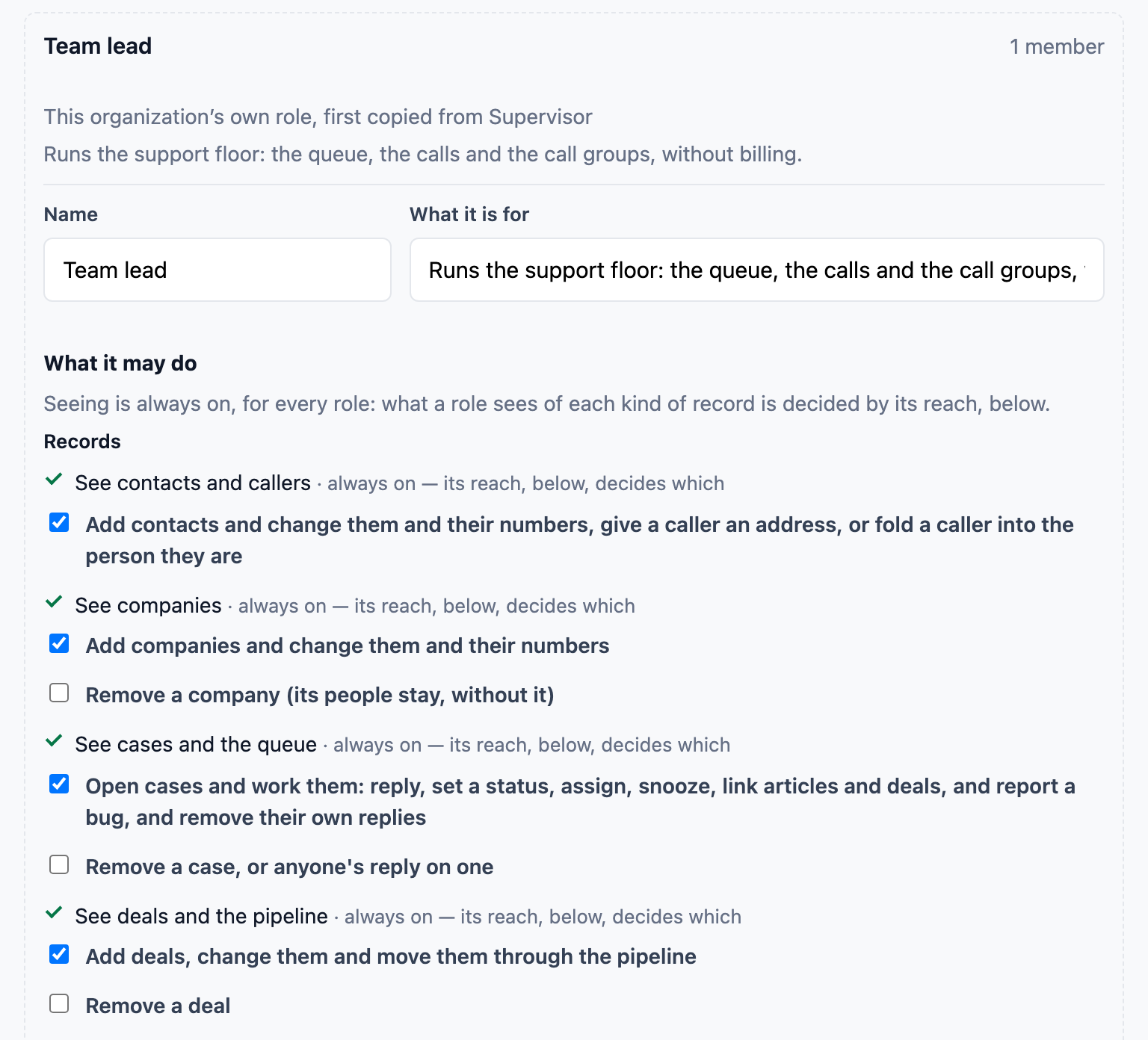
| Roles and permissions | Starter and Professional: permission templates only. Custom permission sets and field-level permissions: Enterprise. [H1] | Every plan, Free included: thirteen ready-made roles, and each role’s reach narrowed to its own records or its team’s. Plus: roles of your own, made from a copy and changed permission by permission, and “View as” to preview any role. |
| Custom objects and roll-ups | Custom objects: Enterprise editions only. Calculation and rollup properties: Sales Hub and Smart CRM Professional and Enterprise. [H4][H5] | Plus: up to 5 record types of your own, linked to contacts, companies, deals and cases. Every plan, Free included: lookup, calculated and roll-up fields, and a contact at several companies with a role at each. |
| Automation | Workflows: 50, limited, on Starter; 300 on Professional; 1,000 on Enterprise. [H1] | Plus: automation flows. A flow is a trigger, conditions and actions in one sentence, tested with a dry run on recent events before it goes on, with ready-made flows to start from. |
| Calling | Starter: 500 minutes a month and one HubSpot number. Professional: 3,000 minutes a month and three numbers, a phone menu, and more minutes at $50 a month per 1,000. Calls are received on a HubSpot-provided number. [H1][H3] | Every plan, Free included: calls in the browser through your own Twilio account, billed by Twilio by the minute with no markup; call groups, voicemail, recording, hold and cold transfer. Plus: phone menus from ready-made templates, ringing the caller’s own owner first, and warm transfer. |
| Phone menu ringing one person | A phone menu branch can ring a single user only if that user holds a Sales Hub or Service Hub Enterprise seat; on Professional it rings a help desk or an inbox number. [H2] | Plus: a number’s setup can ring the caller’s own owner first, alone, for 5 to 30 seconds, before the group. |
| Help desk | Starter: ticketing and one inbox, with no knowledge base. Professional: the help desk, 100 inboxes and one knowledge base of 2,000 articles. Enterprise: 200 inboxes and skills-based routing. [H1] | Every plan, Free included: support email as a queue of cases, several support addresses on Standard and Plus, response-time targets by priority, new cases given out by turns or to the least busy, macros, saved queue views, a satisfaction survey when a case closes, and articles and a help center. (Live chat on your own website is built and switched off for now.) |
HubSpot Enterprise features that ContactRoll has on Plus
- Custom permission sets (HubSpot Enterprise): in ContactRoll, Roles of your own, and “View as” (ContactRoll Plus). [H1]
- Custom objects (HubSpot Enterprise): in ContactRoll, Record types of your own (ContactRoll Plus). [H4]
- A phone menu that rings one named person (needs a HubSpot Enterprise seat): in ContactRoll, Ringing the caller’s own owner first (ContactRoll Plus). [H2]
ContactRoll Plus is $59 a user a month, paid yearly. HubSpot’s Enterprise seats are $150 a month each, billed annually, with $3,500 required onboarding. [H1]
- [H1] HubSpot, Product & Services Catalog: products: https://legal.hubspot.com/hubspot-product-and-services-catalog/products, read 2026-10-14.
- [H2] HubSpot Knowledge Base, set up interactive voice response (last updated September 1, 2026): https://knowledge.hubspot.com/calling/set-up-interactive-voice-response, read 2026-10-14.
- [H3] HubSpot, Product & Services Catalog: add-ons: https://legal.hubspot.com/hubspot-product-and-services-catalog/add-ons, read 2026-10-14.
- [H4] HubSpot Knowledge Base, create and edit custom objects: https://knowledge.hubspot.com/object-settings/create-custom-objects, read 2026-10-31.
- [H5] HubSpot Knowledge Base, create calculation and rollup properties: https://knowledge.hubspot.com/properties/create-calculation-properties, read 2026-10-31.
Sources
HubSpot’s prices change; its own pages below decide. HubSpot is its owner’s trademark.
- HubSpot, Service Hub pricing: https://www.hubspot.com/pricing/service, read 2026-10-09.
- HubSpot, Product & Services Catalog: https://legal.hubspot.com/hubspot-product-and-services-catalog, read 2026-10-09.
- HubSpot Knowledge Base, set up interactive voice response: https://knowledge.hubspot.com/calling/set-up-interactive-voice-response, read 2026-10-09.
- HubSpot Knowledge Base, receive calls in HubSpot: https://knowledge.hubspot.com/calling/receive-calls-in-hubspot, read 2026-10-09.
- HubSpot, Marketing Hub pricing: https://www.hubspot.com/pricing/marketing, read 2026-10-09.
- HubSpot, home page: https://www.hubspot.com/, read 2026-10-09.
- HubSpot, Product & Services Catalog: products (permissions by edition): https://legal.hubspot.com/hubspot-product-and-services-catalog/products, read 2026-10-14.
- HubSpot Knowledge Base, export records: https://knowledge.hubspot.com/import-and-export/export-records, read 2026-10-14.
Questions
What do I give up by moving from HubSpot to ContactRoll?
HubSpot’s app marketplace, its AI agents paid with HubSpot Credits, and the depth of its Enterprise editions, such as 1,000 workflows. ContactRoll has automation flows on Plus, an API and webhooks for your own app, and no marketplace.
How do I get my contacts out of HubSpot?
Open the contacts or companies list in HubSpot and use Export: HubSpot sends a CSV, XLSX or XLS file on every plan to anybody with export permission. ContactRoll’s import reads HubSpot’s columns as they come, company and phone columns included. Deals and tickets are not imported, so keep HubSpot’s export of them.
What changes about calls on the first day?
HubSpot gives you numbers and minutes. In ContactRoll you connect your own Twilio account first and buy a number there; Twilio then bills each minute to that account, and ContactRoll adds nothing to it.